Terminal UI Design - snsagent
Custom branded terminal experience for SNS-MyAgent.
Status
This is a design and behavior guide for the current snsagent terminal experience. Exact colors and layouts can change with the active theme.
Visual identity
The user-facing identity is snsagent. The underlying implementation uses packages from the Pi Agent and oh-my-pi lineage, but those package names are not the product identity.
Typography
snsagent v0.3.9
  model       nine-router/combo1
  dir         /path/to/project

  chat to configure - /help for commands
Startup and chat
The startup splash uses the SNS logo, an orange accent, version, model, directory, platform, and a short shortcut hint. Interactive prompts use the snsagent identity and the active model. /help is a TUI shortcut for the shortcut list.
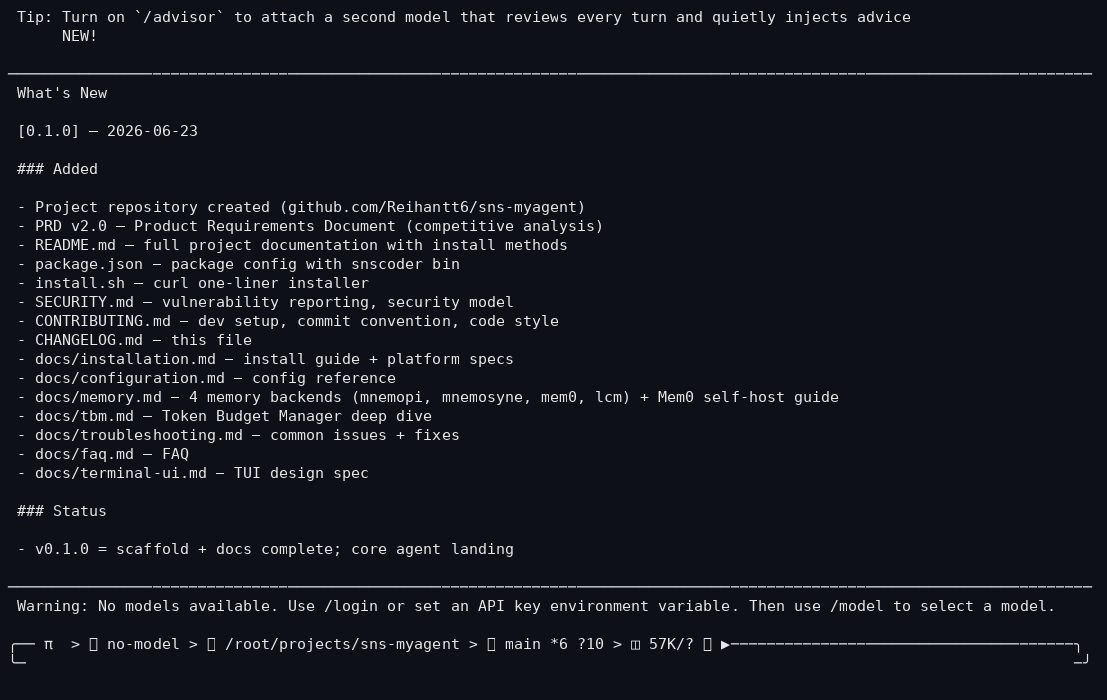
The status bar shows the active model, working directory, git branch, and context usage. Glyph icons in the status bar require a Nerd Font; terminals without one show fallback boxes.
Useful interactive entry points include:
/help
/setup
/model
/settings
UI principles
- Keep the startup view compact.
- Make tool output readable and easy to scan.
- Use status lines for model, context, tokens, and session state.
- Keep warnings actionable.
- Respect terminal width and non-interactive output.
- Avoid presenting upstream package names as the product name.
Layout modes
Interactive terminal
The interactive TUI renders the welcome component, editor, assistant messages, tool results, and status line.
Compact or piped output
- Reduce or remove color when output is not a TTY.
- Avoid spinners in CI.
- Prefer plain text over raw JSON for human output.
Telegram
Telegram mode does not use the terminal UI. It sends formatted text and file attachments through the Telegram adapter.
Inspiration
The project takes useful interaction ideas from Vercel CLI, Linear CLI, Claude Code, Warp, and other terminal tools. These are design references, not runtime dependencies or product identity.
Anti-patterns
- Rainbow text everywhere.
- Giant ASCII art.
- Generic loading messages with no context.
- Raw JSON for human output.
- Full stack traces in user-facing errors.
- Blinking text or annoying animations.
- More than three active colors.
- Progress bars without a label or context.